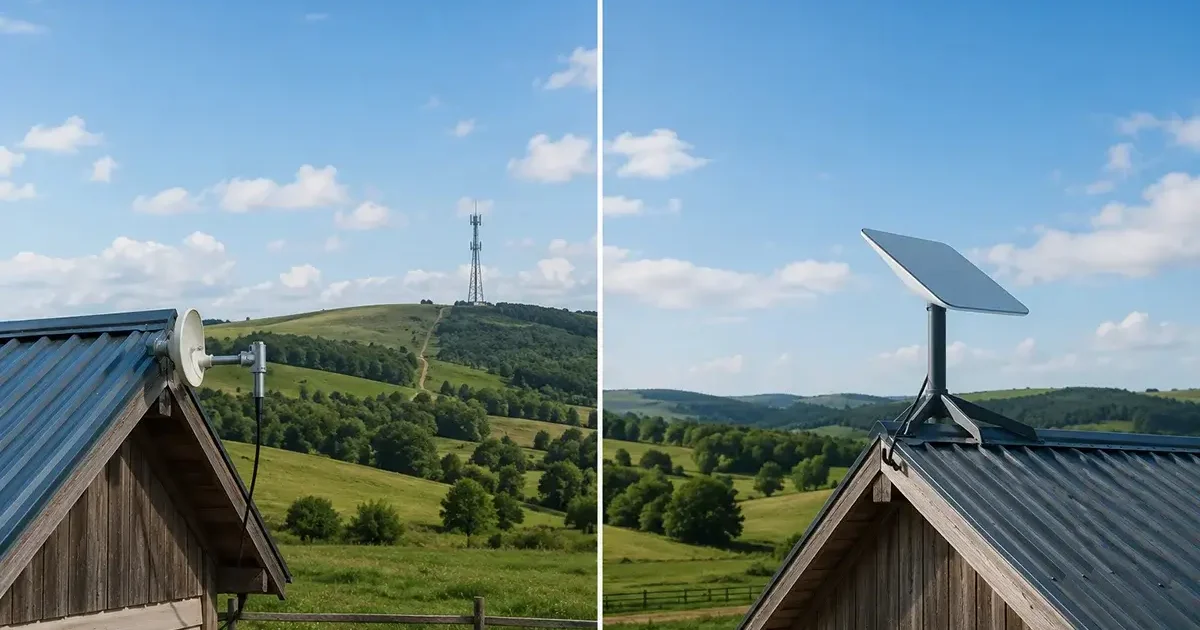
Two technologies dominate the rural broadband landscape in 2026 for properties without cable or fiber access: Starlink satellite internet and local fixed wireless internet from WISPs (Wireless Internet Service Providers). Both deliver genuine broadband — far better than legacy geostationary satellite — but they work differently, cost differently, and are better suited to different rural situations. Understanding the real differences between Starlink and fixed wireless is essential for making the right rural internet decision. This comprehensive comparison covers every meaningful dimension of the Starlink vs fixed wireless choice, with specific guidance for the situations where each technology is the clear winner.
In This Guide
- What Is Fixed Wireless Internet (WISP)?
- Technology Comparison: How Each System Works
- Speed and Performance Comparison
- Latency: The Critical Differentiator
- Pricing and Total Cost Comparison
- Coverage and Availability
- Reliability and Weather Performance
- Installation and Setup
- When to Choose Fixed Wireless WISP
- When to Choose Starlink
- Using Both: The Dual-Connection Strategy
- Frequently Asked Questions
What Is Fixed Wireless Internet (WISP)?
A WISP (Wireless Internet Service Provider) delivers internet to your property using radio signals from a tower or mountain-top transmitter to an antenna or dish mounted on your home. The WISP owns and operates towers strategically placed to cover rural areas, and customer antennas on rooftops or masts receive the signal and connect to your indoor router via Ethernet cable. The technology is proven, mature, and used by hundreds of rural WISPs across the United States to serve communities that commercial cable and fiber providers haven’t reached.
Fixed wireless differs fundamentally from cellular home internet (T-Mobile, Verizon) in that WISPs build and operate their own dedicated towers and frequency licenses specifically for home internet service — rather than using shared cellular infrastructure also serving mobile phones. This dedicated infrastructure approach often allows WISPs to deliver better performance characteristics for home internet than shared cellular networks, particularly in congestion management.
Fixed wireless also differs fundamentally from Starlink in that it requires line-of-sight to a WISP tower within approximately 10–25 miles of your property, whereas Starlink uses satellites 340–570 km above Earth to provide coverage anywhere with open sky access. This difference in infrastructure architecture drives most of the meaningful distinctions between the two technologies.

Technology Comparison: How Each System Works
| Factor | Fixed Wireless (WISP) | Starlink (LEO Satellite) |
|---|---|---|
| Signal path | Tower on ground → antenna on your home | Satellites at 340–570 km → dish on your home |
| Signal distance | 3–25 miles typically | 340–570 km to satellite |
| Line of sight required | Yes — to WISP tower | Yes — to open northern sky |
| Technology standard | Licensed/unlicensed microwave, CBRS, LTE | Proprietary LEO satellite constellation |
| Data cap | Usually unlimited | 1 TB priority (Standard), unlimited (Business) |
| Coverage area | Within tower range — not universal | Universal — any rural US address |
| Weather impact | Rain, ice, heavy fog can reduce performance | Heavy precipitation can briefly reduce performance |
Speed and Performance Comparison
Both technologies deliver genuine broadband speeds adequate for modern rural internet use. The actual performance varies significantly based on local implementation quality:
| Metric | Typical WISP Performance | Typical Starlink Performance |
|---|---|---|
| Download speed | 25–200 Mbps (varies by provider and technology) | 65–115 Mbps (Standard), up to 220 Mbps (Priority) |
| Upload speed | 10–50 Mbps (often more symmetric than Starlink) | 8–18 Mbps (Standard), 15–35 Mbps (Priority) |
| Latency | 5–30 ms | 20–60 ms |
| Peak-hour consistency | Depends on tower capacity and local users | Depends on coverage cell density |
| Jitter | Very low (2–8 ms typical) | Low to moderate (5–20 ms) |
A well-run WISP using modern CBRS or licensed spectrum technology can deliver performance that rivals or exceeds Starlink on every metric — lower latency, more symmetric upload speeds, and better jitter characteristics. The caveat: WISP performance varies enormously between providers. An undercapacitated WISP with too many subscribers per tower may deliver poor performance during peak hours, while a well-run WISP with modern equipment and appropriate capacity planning will consistently outperform Starlink in raw performance metrics.
Latency: The Critical Differentiator
Latency is where fixed wireless WISPs have a clear technical advantage over Starlink. A WISP signal traveling 10 miles to a local tower and back travels approximately 20 miles total — at the speed of light, this takes under 0.1 ms of pure propagation delay. Total WISP latency including network processing: 5–30 ms, with many modern WISPs achieving consistent 8–15 ms.
Starlink’s signal travels 340–570 km to a satellite and back — approximately 680–1,140 km round trip. This creates a minimum propagation delay of approximately 2–4 ms, and with network processing, total Starlink latency is 20–60 ms in practice. This is dramatically better than geostationary satellite’s 600 ms, and adequate for all mainstream internet applications including video calls and gaming. But WISP’s 8–15 ms latency is meaningfully lower than Starlink’s 25–50 ms for the most latency-sensitive applications:
- Competitive online gaming: The difference between 12 ms and 45 ms latency is significant for competitive gaming. WISP’s lower latency is a meaningful advantage for competitive gamers.
- High-frequency financial trading: Any latency-sensitive trading application benefits from WISP’s lower latency, though rural users are rarely in this category.
- Remote desktop and VPN: Both work on Starlink, but WISP’s lower latency makes the experience feel more natural and responsive, particularly for graphically intensive remote desktop sessions.
Pricing and Total Cost Comparison
| Cost Factor | Fixed Wireless (WISP) | Starlink Standard |
|---|---|---|
| Monthly service | $40–$80/month (typical rural WISP) | $120/month |
| Hardware (customer equipment) | $0–$150 (often provided/leased by WISP) | $349 (purchased, owned) |
| Installation | $0–$100 (WISP installer handles it) | $0 (DIY) |
| Monthly data limit | Usually unlimited | 1 TB priority (then deprioritized) |
| Contract | Varies (often month-to-month) | None |
| Annual cost (typical) | $480–$960/year | $1,440/year + $349 hardware |
The cost advantage of WISP over Starlink can be substantial — $40–$80/month versus $120/month represents $480–$960 in annual savings. Over 5 years, a $50/month WISP saves $4,200 compared to Starlink Standard. If a quality WISP is available at your rural property, the financial case for choosing it over Starlink is compelling — both deliver adequate performance for most rural household needs, and the WISP’s lower monthly cost and unlimited data are genuine advantages.
Coverage and Availability
This is where Starlink’s advantage is most pronounced and most consequential. Starlink is available at any rural US address with a clear sky view — approximately 99.9% of rural US properties in 2026. No waitlist, no site survey required, immediate ordering capability.
WISP coverage is highly geographically specific. A WISP serving your neighbor half a mile down the road may not have line-of-sight to your property due to terrain, tree cover, or their tower placement. WISPs typically cover 3–25 mile radii from each tower, but terrain can dramatically limit that effective coverage. There is no single database showing exactly which WISPs serve which rural addresses — finding a WISP requires local inquiry (neighbors, county extension office, local Facebook groups) and often a site survey to confirm coverage before installation.
For rural properties in areas with no nearby WISP tower or with terrain blocking any available WISP tower, Starlink is the only viable broadband option regardless of its higher monthly cost.
When to Choose Fixed Wireless WISP
- A quality WISP is available at your specific property with confirmed line-of-sight: If a local WISP can serve your address at $50–$80/month with adequate performance, choose the WISP. The cost savings over Starlink’s $120/month are real money — $480–$840/year that stays in your pocket or your rural household budget.
- Lower latency is important for your use case: Competitive gaming, latency-sensitive remote desktop, and real-time collaborative applications benefit from WISP’s 8–15 ms versus Starlink’s 25–50 ms latency.
- You have neighbors on the WISP with positive reviews: A WISP with good local reputation for performance and customer service is lower risk than an unknown provider. Local knowledge matters for WISP selection.
- Unlimited data is important at the lowest cost: WISPs typically offer unlimited data without the 1 TB threshold management that Starlink Standard requires. For households that consume 1–3 TB monthly, a WISP’s unlimited data at lower cost is significantly better value.
When to Choose Starlink
- No WISP is available or confirmed at your address: Starlink is the universal option that doesn’t require tower proximity or line-of-sight to any ground infrastructure. If no WISP serves your address, Starlink is the choice.
- You need internet immediately: Starlink hardware ships within days and self-installs in 2–4 hours. WISP installations require scheduling a service technician visit that may take 1–4 weeks depending on the provider’s installation queue.
- Your property’s terrain blocks line-of-sight to WISP towers: Starlink’s satellites are accessible from any property with open northern sky access — even if your property is in a hollow or surrounded by terrain that blocks ground-based wireless signals to nearby towers.
- You need global or multi-location coverage: Starlink Roam works anywhere in the US (or worldwide with Global Roam) — WISP coverage is fixed to the specific geographic area served by the provider’s towers.
- A reliable local WISP is not available in your area: Not all WISPs are equal. An undercapacitated or poorly managed WISP with congested towers may deliver worse performance than Starlink despite the lower monthly cost. If the only available WISP has poor local reputation, Starlink’s consistent performance is the better choice.
Using Both: The Dual-Connection Strategy
For rural households and businesses where internet reliability is critical — remote workers, rural businesses, telehealth-dependent households, farm operations — using both a WISP (as primary) and Starlink (as backup, or vice versa) provides the highest possible rural broadband reliability. A dual-WAN router (Peplink, Netgear Orbi Pro) manages both connections with automatic failover: if the primary connection drops, all traffic instantly routes through the backup without manual intervention.
The most cost-effective dual-connection configuration for most rural households: WISP as primary (best performance + lowest cost) + Starlink Roam on pause (hardware purchased, service paused except during WISP outages). The Starlink Roam plan can be paused and resumed through the app — keeping the hardware ready for instant activation when the WISP has an extended outage, without paying Starlink’s monthly fee during normal WISP operation. This approach maximizes the WISP’s cost advantage during normal operation while maintaining a satellite backup for the rare extended outage events. According to Speedtest.net’s fixed broadband performance benchmarks, the best rural connectivity outcomes in 2026 consistently come from dual-connection setups that combine multiple technologies rather than relying on any single provider.

Frequently Asked Questions
How do I find WISPs in my rural area?
The best sources for finding rural WISPs: (1) Ask neighbors — local knowledge is the most reliable source; (2) Check the FCC National Broadband Map at broadbandmap.fcc.gov — fixed wireless providers are listed by address; (3) Search “[your county] wireless internet” or “[your county] WISP” online; (4) Ask your county extension office — rural extension agents frequently know local ISP options; (5) Check local Facebook community groups where neighbors discuss internet options. Not all WISPs are well-represented in any single database — combining multiple search approaches gives the most complete picture of what’s available in your area.
Is fixed wireless internet as reliable as Starlink?
A well-run WISP with modern equipment and adequate capacity can be more reliable than Starlink during peak hours — the dedicated infrastructure and lower latency provide more consistent performance. However, WISPs can also be less reliable than Starlink in bad weather (heavy rain and ice on the antenna), when the provider’s tower has equipment issues (a single tower failure affects all subscribers in that coverage area), or when the WISP is undercapacitated (too many subscribers per tower creating congestion). Starlink’s distributed satellite constellation means no single point of failure affects coverage. Before choosing a WISP, ask current subscribers about their reliability experience over multiple seasons.
Can I switch from Starlink to a WISP after it becomes available in my area?
Yes, easily. Starlink’s no-contract model means you can cancel Starlink when a WISP becomes available in your area without any early termination fee. You keep the Starlink hardware after canceling — which you can use as backup connectivity by resubscribing if the WISP later has an extended outage. This flexibility to try the WISP and fall back to Starlink makes switching between the two technologies completely risk-free from a financial commitment standpoint.



Leave a Reply