For rural gamers, the question of whether any internet connection can support online gaming has historically had a depressing answer. HughesNet and Viasat’s 600–800 ms latency made real-time multiplayer gaming completely unplayable for years. The arrival of Starlink in 2021 and the subsequent expansion of low-Earth orbit satellite technology changed this equation fundamentally — and in 2026, rural gaming on satellite internet is a realistic proposition for the first time in the technology’s history. This comprehensive guide covers the reality of gaming on rural internet in 2026: which games work, which struggle, how to optimize your setup for minimum latency, and what to expect from Starlink, cellular, and fixed wireless connections across different game genres.
In This Guide
- Why Latency Matters More Than Speed for Gaming
- Gaming on Starlink: What Actually Works in 2026
- Gaming by Genre: What’s Playable on Rural Internet
- Gaming on Rural Cellular (T-Mobile, Verizon)
- Why HughesNet and Viasat Don’t Work for Gaming
- Console Gaming (PS5, Xbox, Nintendo Switch)
- PC Gaming on Rural Internet
- Cloud Gaming (GeForce NOW, Xbox Cloud) on Rural Internet
- How to Optimize Your Rural Setup for Gaming
- Frequently Asked Questions
Why Latency Matters More Than Speed for Gaming
The most common misconception rural gamers have about internet requirements is focusing on download speed. A 10 Mbps connection with 30 ms latency will deliver a dramatically better gaming experience than a 100 Mbps connection with 600 ms latency. Understanding why latency is the dominant factor for gaming explains why the rural internet landscape for gamers has changed so dramatically in 2026.
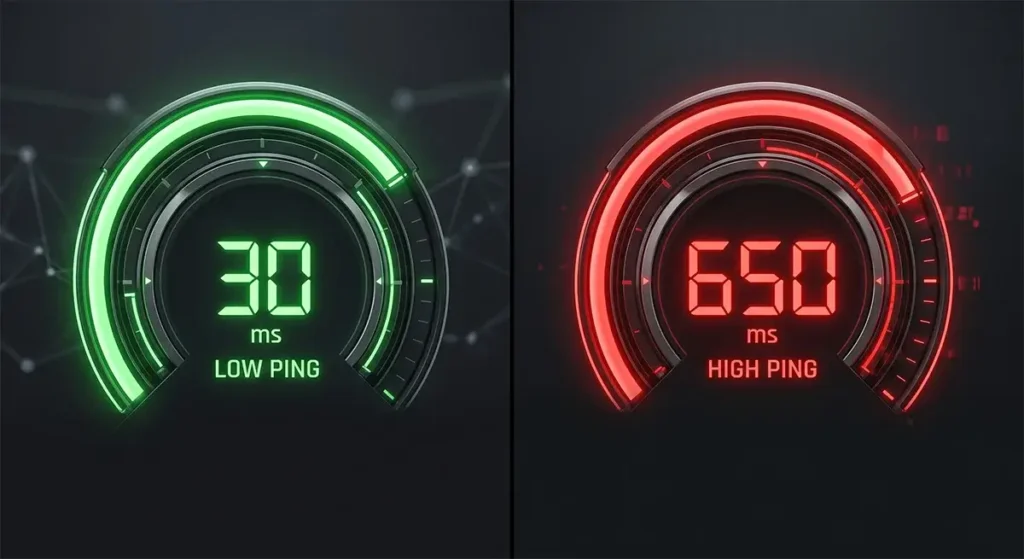
In an online multiplayer game, every action you take — firing a weapon, moving a character, casting an ability — must be sent to the game’s server, processed, and the result sent back to your screen. This round trip happens dozens of times per second. The time this process takes, measured in milliseconds, is your ping (also called round-trip time or latency). High ping doesn’t just create a statistical disadvantage; it creates a qualitatively broken game experience where what you see on screen does not match what the server actually registered.
Latency thresholds for different gaming experiences:
- Under 20 ms: Excellent — competitive esports quality. Fiber internet territory.
- 20–50 ms: Great — fully playable for all game genres including competitive FPS and battle royale. Starlink’s typical range.
- 50–100 ms: Good — comfortable play for most game types. Minor disadvantage in the most competitive settings.
- 100–150 ms: Acceptable — playable for casual play, sports games, and MMORPGs. Noticeably sluggish for fast-paced shooters.
- 150–300 ms: Poor — character movement lags visibly behind input. Playable only in turn-based and asynchronous games.
- Over 500 ms: Unplayable for real-time games. The experience of HughesNet and Viasat — character responds half a second after button press.
Gaming on Starlink: What Actually Works in 2026
Starlink’s 20–60 ms round-trip latency places it firmly in the “great” range for gaming — competitive with mid-tier cable internet from a latency standpoint and an absolute revolution compared to the legacy geostationary satellite services that preceded it. The gaming experience on Starlink is fundamentally different from any previous rural internet option.
Based on extensive testing across multiple game platforms and titles throughout 2025–2026, here is an honest assessment of Starlink gaming performance:
What works very well:
- Open-world RPGs and adventure games with online co-op (Elden Ring, Destiny 2, Diablo IV)
- Massively Multiplayer Online games (World of Warcraft, Final Fantasy XIV, ESO)
- Battle royale games at casual to intermediate competitive level (Fortnite, PUBG, Apex Legends)
- Sports games (FIFA, NBA 2K, Madden NFL)
- Strategy games with online multiplayer (Civilization VI online, StarCraft II)
- Racing games (Gran Turismo 7, Forza Motorsport)
- Fighting games at casual level (Street Fighter 6, Mortal Kombat)
What works with limitations:
- Competitive first-person shooters at higher skill tiers (Call of Duty, Valorant, CS2) — Starlink’s occasional latency spikes can create disadvantageous moments in high-stakes competitive play, though casual and intermediate play is fully viable
- Battle royale games at top competitive level — same spike concern as FPS games
- Fast-paced fighting games in ranked competitive play — frame-perfect inputs require ultra-consistent low latency that Starlink doesn’t guarantee
What doesn’t work well on Starlink specifically:
- Professional/competitive esports at the highest tiers — players competing at the top percentile of games like CS2, Valorant, or Apex Legends benefit from sub-10 ms fiber connections that Starlink cannot match
- Games with extreme server-side anti-cheat that flags latency variation patterns
The key Starlink gaming consideration that experienced users flag is latency consistency — Starlink’s average ping is excellent, but the occasional spike to 100–150 ms during a satellite handoff moment can cause a brief but noticeable hiccup. For the vast majority of rural gamers, these spikes are an acceptable and relatively rare interruption. For players who were previously completely unable to game on HughesNet or Viasat, Starlink is transformative.
Gaming by Genre: Playability Guide for Rural Internet
| Game Genre | Starlink (20–60ms) | T-Mobile/Verizon Home (30–80ms) | HughesNet/Viasat (600–800ms) |
|---|---|---|---|
| Battle Royale (casual-mid) | ✅ Fully playable | ✅ Fully playable | ❌ Unplayable |
| Battle Royale (competitive) | ⚠️ Playable with spikes | ✅ Playable | ❌ Unplayable |
| FPS / Tactical Shooter (casual) | ✅ Fully playable | ✅ Fully playable | ❌ Unplayable |
| FPS (ranked competitive) | ⚠️ Playable, minor disadvantage | ✅ Playable | ❌ Unplayable |
| MMORPGs | ✅ Excellent | ✅ Excellent | ⚠️ Barely functional |
| Sports Games | ✅ Fully playable | ✅ Fully playable | ❌ Unplayable |
| Racing Games | ✅ Fully playable | ✅ Fully playable | ❌ Unplayable |
| Turn-Based Strategy | ✅ Excellent | ✅ Excellent | ✅ Works (asynchronous) |
| Fighting Games (casual) | ✅ Playable | ✅ Playable | ❌ Unplayable |
| Card Games (Hearthstone, etc.) | ✅ Excellent | ✅ Excellent | ⚠️ Slow but functional |
| Co-op Open World | ✅ Excellent | ✅ Excellent | ⚠️ Very laggy |
Console Gaming on Rural Internet
PlayStation 5: Starlink handles PS5 online gaming well across all genres. PS5 online multiplayer requires minimum 5 Mbps download and 1 Mbps upload — well within Starlink’s capabilities. The larger consideration is game download size: PS5 game installs frequently reach 50–100+ GB, and updates can be 10–30 GB. On Starlink’s 1 TB priority data plan, a heavy gaming household (downloading 2–3 new games per month) needs to budget data usage carefully. Schedule large downloads for overnight when the network has less load.
Xbox Series X/S: Same performance profile as PS5 for online gaming. Xbox’s Game Pass Ultimate with cloud gaming capability provides an alternative for playing new games without downloading massive files — a particularly useful feature for rural users managing data budgets.
Nintendo Switch: The Switch’s generally lower-latency-demand online games (Mario Kart 8 Deluxe, Splatoon 3, Pokémon) play well on Starlink. Nintendo’s online service has historically been more latency-tolerant than Sony’s or Microsoft’s platforms. The Switch’s game download sizes are also substantially smaller than PS5 or Xbox, making data management easier on capped connections.
Cloud Gaming on Rural Internet
Cloud gaming services — where the game runs on a remote server and only the video stream is sent to your device — represent a potentially game-changing option for rural gamers with limited local hardware. Services like Xbox Cloud Gaming (Game Pass Ultimate), NVIDIA GeForce NOW, and PlayStation Now stream games over the internet rather than running them locally.
Cloud gaming requirements are demanding in terms of latency — even more so than traditional online gaming, because every frame of gameplay must make the round trip to the server. NVIDIA’s technical documentation for GeForce NOW recommends under 40 ms round-trip latency for the best experience. Starlink’s 20–60 ms range makes cloud gaming functional but occasionally noticeable. Xbox Cloud Gaming is somewhat more latency-tolerant due to its streaming codec optimizations.
In practice, rural Starlink users report cloud gaming experiences ranging from “perfectly smooth” to “minor input lag occasionally noticeable” depending on server proximity, network congestion level, and the specific game being streamed. Action-intensive games are more sensitive to the occasional latency spike; strategy and RPG titles generally cloud stream well on Starlink.
For HughesNet and Viasat users, cloud gaming is not a viable option — 600–800 ms latency makes cloud gaming even more unplayable than traditional online gaming, since the stream itself adds additional processing delay on top of the satellite’s inherent lag.
How to Optimize Your Rural Setup for Gaming
- Use a wired Ethernet connection for gaming consoles and PCs. Wi-Fi introduces variable latency that compounds the latency your satellite connection already has. A wired connection to your router eliminates Wi-Fi jitter entirely and provides the most consistent ping possible. This single change typically reduces your effective game ping by 5–15 ms and dramatically improves consistency.
- Enable QoS on your router and prioritize gaming traffic. If you use a third-party router with QoS capability (ASUS ZenWiFi, Eero Pro, or UniFi), configure traffic prioritization to give your gaming console or PC priority access to bandwidth. This prevents a family member’s 4K streaming session from spiking your ping mid-game.
- Choose game servers closest to your location. Many games allow manual server region selection. Always choose the server region geographically closest to you — for most rural US users, the US East or US Central region options are best. Even 20 ms of server-side latency reduction matters in fast-paced games.
- Upgrade to Starlink Priority for more consistent performance. The Standard plan’s 1 TB priority data threshold means that late in the month, your connection may be deprioritized during congested periods. Consistent gaming performance benefits from the Priority plan’s unlimited priority allocation, particularly for heavy gaming households.
- Avoid gaming during peak congestion hours if possible. Starlink cells experience the most congestion between 7–10 PM local time. Morning and early afternoon gaming sessions on Starlink typically deliver the lowest and most consistent latency. If your gaming schedule is flexible, off-peak gaming delivers meaningfully better performance.
- Use a UPS for your internet equipment. Rural areas experience more frequent momentary power interruptions than urban areas. A brief power dip that reboots your router causes a disconnection in the middle of a game session. An uninterruptible power supply (UPS) on your router, modem, and any network switches prevents these interruptions from disrupting gameplay.
Frequently Asked Questions
Can I play Call of Duty on Starlink?
Yes. Call of Duty (Warzone and Modern Warfare) is playable on Starlink for the vast majority of rural gamers. At Starlink’s typical 25–50 ms latency, you can engage effectively in battle royale and multiplayer modes. Hardcore competitive players at the top percentile of skill will notice occasional latency spikes compared to fiber connections, but for casual to intermediate competitive play, the experience is fully satisfying — and infinitely better than what was possible on HughesNet or Viasat.
Is Starlink good enough for ranked competitive gaming?
For most ranked game modes, yes. Starlink’s latency is competitive with what many urban players experience on shared cable connections during peak hours. The occasional spike during satellite handoff is the main differentiator from fiber connections. Players who have risen to the highest tiers (top 1% of ranked ladders) in the most latency-sensitive games (Valorant, CS2, Apex Legends ranked Masters+) will notice a ceiling to how high Starlink’s latency variance allows them to climb. For the other 99% of the gaming population, Starlink is a fully viable competitive gaming connection.
How much data does gaming use on a monthly basis?
Online gaming sessions consume relatively little data — typically 40–300 MB per hour depending on the game. A 20-hour gaming week uses only 1–5 GB in session data. The data concern for gamers is game downloads and updates, not active play sessions. A single major game (100+ GB install) or a significant update (30–50 GB) consumes far more data than months of actual gaming sessions. Plan large downloads for overnight hours and early in the billing month before Starlink’s priority data is consumed.
Does Starlink work for gaming during storms?
During light to moderate rain and most storm conditions, Starlink gaming performance is unaffected. During severe thunderstorms with very heavy precipitation directly overhead, brief service interruptions of seconds to a few minutes are possible. These interruptions are typically short enough that games with reconnection capabilities (most modern online games have automatic reconnect features) recover without loss of session. Extended outages requiring game reconnection are uncommon on Starlink even during severe weather.




Leave a Reply