
Boaters, marina liveaboards, coastal fishing operations, and inland waterway travelers represent one of the most enthusiastic early adopter communities for Starlink’s maritime capabilities. Before Starlink’s maritime service launched, reliable broadband on the water was either prohibitively expensive (VSAT maritime systems costing thousands per month for commercial operators) or completely impractical (cellular coverage ending at the shoreline). Starlink has fundamentally changed what’s possible for recreational and commercial watercraft in 2026 — but the marine Starlink experience differs significantly from the residential installation in ways that any prospective boat user needs to understand before purchasing. This complete guide covers marine Starlink options, hardware, performance, regulatory considerations, and the real-world liveaboard and cruising experience.
In This Guide
- Starlink Marine Service Options Overview
- Roam vs Maritime: Which Service for Your Boat?
- Maritime Pricing and Plans
- Marine Hardware: Flat HP Dish and Standard Gen 3
- Installing Starlink on a Boat
- Real-World Performance on Water
- Offshore Coverage: How Far Does It Reach?
- Marina and Anchorage Use
- Starlink vs Cellular for Coastal Cruisers
- Starlink for Liveaboard Sailors
- FAQs
Starlink Marine Service Options Overview
Starlink offers three service approaches relevant to boat and marine users, each with different capability, cost, and hardware requirements:
Starlink Maritime (Flat High Performance dish): Starlink’s purpose-built marine service, using the Flat High Performance (Flat HP) dish designed for permanent installation on vessels. The Flat HP dish is engineered for use while the vessel is in motion at speeds up to 50+ knots, in marine weather environments, and mounted at various angles. Service starts at $250/month for 50 GB of priority data, scaling up to $1,000/month for unlimited priority maritime service. Hardware costs approximately $2,500 for the Flat HP kit.
Starlink Roam (Standard Gen 3 dish, stationary use): Standard Starlink residential dishes with the Roam service plan ($150/month) can be used on boats while anchored or at a dock — but not while underway. The standard dish is not designed for marine mounting or in-motion use. This is the most cost-effective approach for coastal cruisers who primarily use internet at anchor and in marinas, and for liveaboards who are rarely underway.
Starlink Roam + In-Motion add-on (Flat HP dish): The In-Motion add-on enables underway use for Roam subscribers, but requires the $2,500 Flat HP dish hardware. At $150/month service + $50/month In-Motion = $200/month, this is the most affordable option for sailors and boaters who want full underway connectivity at the cost of the Flat HP dish hardware investment.
Roam vs Maritime: Which for Your Boat?
| Scenario | Best Option | Why |
|---|---|---|
| Liveaboard, rarely moves the boat | Roam ($150/mo) + Gen 3 dish | Cheapest path, standard dish adequate for stationary use |
| Coastal cruiser, internet at anchor/marina | Roam ($150/mo) + Gen 3 dish with quick-mount | Portable setup, deploy at anchor, stow underway |
| Bluewater sailor, wants internet while sailing | Roam + In-Motion ($200/mo) + Flat HP dish | Underway capability at lower cost than Maritime plan |
| Commercial fishing vessel, heavy usage | Maritime plan ($250–$1,000/mo) + Flat HP | Priority data, SLA terms, professional support |
| Occasional weekend boater | Roam ($150/mo), pause when not cruising | Roam plan allows service pausing up to 12 months |
Maritime Pricing and Plans
Starlink Maritime pricing reflects the premium nature of marine communications infrastructure. The plans are structured around priority data allocations designed for different vessel and operation types:
| Plan | Monthly Cost | Priority Data | After Priority | Best For |
|---|---|---|---|---|
| Maritime 50 GB | $250/mo | 50 GB | 1 Mbps unlimited | Light users, occasional passage |
| Maritime 1 TB | $500/mo | 1 TB | 1 Mbps unlimited | Regular passages, family liveaboard |
| Maritime Unlimited | $1,000/mo | Unlimited priority | N/A | Commercial vessels, high-usage operations |
For recreational sailors and cruisers, the Maritime 50 GB plan at $250/month is often the starting point — but many find the Roam plan at $150/month (without in-motion capability) serves their needs if they primarily use internet at anchor or in marinas rather than while sailing. The 50 GB priority data threshold on Maritime is adequate for navigation chart updates, weather routing, email, video calls, and light streaming. Continuous streaming or video conferencing underway consumes priority data quickly.
Marine Hardware: Flat HP Dish vs Standard Gen 3
The hardware choice is the most consequential marine Starlink decision:
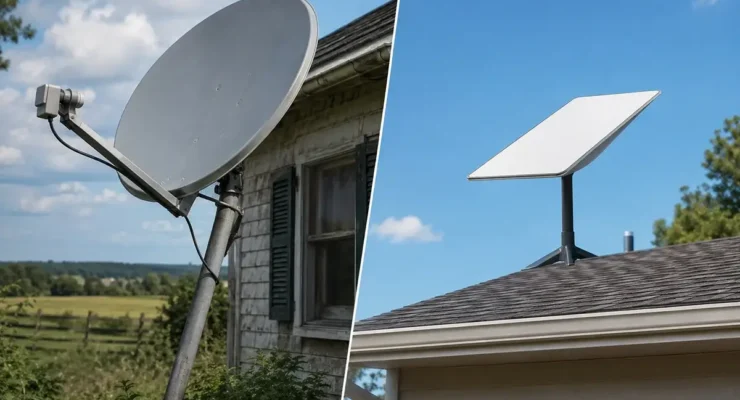
Flat High Performance (Flat HP) Dish (~$2,500): The purpose-built marine dish. Key specifications relevant to boaters:
- IP56 rated — protected against salt spray and immersion from wave splash
- Operational in winds up to 140 mph (hurricane-force)
- Works while vessel is in motion at any speed
- Operating temperature range -30°C to +55°C — suitable for tropical and high-latitude cruising
- Designed for mounting at various angles (flush deck, mast, arch, radar tower)
- Anti-corrosion materials for long-term marine exposure
Standard Gen 3 Residential Dish ($349): What most recreational boaters who don’t need underway connectivity use. Limitations in marine context:
- Not designed for in-motion use — will shut down if it detects significant vessel motion
- IP54 rated — splash resistant but not immersion rated
- Not designed for salt air long-term exposure without protective measures
- Can be used successfully at anchor and dock if mounted securely away from spray zones
- Many coastal cruisers use it successfully for years with proper care and placement
For serious blue-water passage makers and any boater wanting internet while underway, the Flat HP dish investment is non-negotiable. For coastal cruisers, liveaboards at a marina, and sailors who don’t need connectivity while sailing, the $2,151 cost difference between the standard dish and the Flat HP makes the Gen 3 dish the rational choice.
Installing Starlink on a Boat
Marine Starlink installation presents unique challenges compared to land-based setups. Key considerations for each vessel type:
Powerboats and motor yachts: The radar arch, hardtop, or flybridge provides the most common mounting locations. Use stainless steel hardware for all mounting points — any standard carbon steel fasteners will corrode rapidly in salt environments. Run the cable through the same conduit as other electronics where possible to minimize cockpit penetrations.
Sailing yachts: Mast mounting provides the highest elevation and best sky view, but the mast’s motion during sailing (heeling, pitching, rolling) is the harshest environment for any electronics. Most sailing liveaboards mount the Flat HP dish on the stern arch, radar mount, or a dedicated mount on the pushpit. Avoid placing the dish anywhere it can be struck by the boom or sheets.
Cable management: Saltwater is highly corrosive to electrical connections. Use self-amalgamating tape over all connector joints where the cable is exposed to spray. Route the cable away from areas of rope chafe, moving hardware, and direct spray zones. Use stainless steel cable clamps at support points rather than plastic clips that become brittle in UV exposure.
Power supply: The Flat HP dish draws approximately 65–100W. Most marine electrical systems are 12V or 24V DC. A purpose-built Starlink maritime DC power supply converts 12V or 24V to the required input without an inverter — significantly more efficient than running the AC power adapter through an inverter. Third-party 12V Starlink power solutions are available from WeBoost Marine, Victron Energy, and dedicated Starlink marine accessory suppliers.
Real-World Performance on the Water
Marine Starlink performance varies based on several factors unique to the waterborne environment:
Open water performance: Offshore, away from land-based interference and with unobstructed sky views from horizon to horizon, Starlink Maritime delivers some of its best performance. Users on ocean passages report download speeds of 80–150 Mbps with latency of 25–55 ms — comparable to what rural land users experience. The absence of terrestrial obstacles creates ideal satellite acquisition conditions.
Coastal and harbor performance: Performance in busy harbors and coastal anchorages can vary. Popular anchorages during peak cruising season may have many Starlink users in the same coverage cell, creating congestion similar to a Starlink cell in a densely populated rural area. Performance during peak evening hours in popular destinations like the Bahamas, Caribbean, and Pacific Mexico has been noted as more variable than offshore or in less-popular anchorages.
High latitude performance: Starlink’s LEO constellation has been specifically noted by Alaska coastal sailors, Pacific Northwest cruisers, and Great Lakes sailors for delivering reliable connectivity in latitudes where geostationary satellite services have always struggled. Coverage extends to approximately 90° latitude — essentially the poles — making Starlink viable for high-latitude cruising passages that no previous affordable satellite service could support.
According to performance data compiled by the cruising community at Noonsite.com — one of the most trusted resources for bluewater sailors — Starlink Maritime has become the dominant connectivity choice for offshore passage makers who previously had no viable option beyond Iridium satellite phone data at exorbitant per-byte rates.
Offshore Coverage: How Far Does It Reach?
Starlink’s offshore coverage has expanded dramatically since the maritime service launched. As of 2026:
- Within 200 nautical miles of the continental US coastline: Essentially complete coverage with full performance.
- Atlantic Ocean crossing routes: Coverage across the North Atlantic on typical trade wind routes is very good, with occasional brief gaps in the mid-Atlantic that SpaceX continues to fill with additional satellites.
- Pacific Ocean: The North Pacific crossing routes (Hawaii to Pacific Northwest, trans-Pacific to Japan) have good coverage. The South Pacific passage routes (west coast of Americas to Polynesia, Australia, New Zealand) have improving coverage with some remaining gaps in the deep South Pacific.
- Caribbean: Excellent coverage throughout the Caribbean basin, including all major island groups and the Venezuelan, Colombian, and Central American coastlines.
- Mediterranean: Full coverage with excellent performance throughout.
For the latest maritime coverage map, check Starlink’s official maritime coverage visualization before planning any offshore passage.

Frequently Asked Questions
Can I use my residential Starlink dish on my boat at anchor?
Yes, with the Roam service plan. The residential Gen 3 dish can be used on a boat while anchored or docked — it must be stationary while operating. Many coastal cruisers mount the standard dish on a secure stern mount or bring it aboard on a portable mount, deploy it when anchored, and stow it while underway. This approach works well and is the most cost-effective marine Starlink solution for sailors who don’t need connectivity while sailing.
Does Starlink Maritime work in the Bahamas and Caribbean?
Yes. Coverage throughout the Bahamas, Caribbean islands, and surrounding coastal waters is excellent and has been a major selling point for cruisers on the East Coast-to-Bahamas and Caribbean circuit. Performance in popular Bahamian anchorages during peak winter season has been reported as generally good, with occasional peak-hour congestion in the most popular spots (Staniel Cay, Georgetown, Nassau) where many vessels may be in the same coverage cell.
How does Starlink compare to Iridium for offshore sailing?
Iridium satellite phones and Iridium GO! devices provide emergency voice calling and extremely low-bandwidth data (email text, GRIB weather files) at much lower data rates than Starlink. For offshore passages, the two technologies serve different purposes: Starlink for broadband internet (navigation, weather routing, video calls with family, entertainment), Iridium for emergency voice communication and backup weather data when Starlink service is unavailable. Most serious blue-water sailors carry both.
How do I mount Starlink on a sailboat without drilling through the deck?
Several no-drill mounting solutions are popular with sailors reluctant to create new deck penetrations. The most common approach is a stern arch or pushpit rail mount using marine-grade stainless steel clamps and a purpose-built Starlink adapter bracket. Manufacturers including Seaview, Scanstrut, and Mast-Pro make rail-mount systems specifically for Starlink that clamp to 1-inch or 1.25-inch stainless tubing without any drilling. The cable can be routed through existing deck penetrations used for other electronics wiring, eliminating the need for a new deck fitting. For sailboats with a dedicated electronics arch, the arch structure provides both the mounting point and a natural cable routing path — the most elegant no-drill solution for most cruising sailboats.
Does Starlink work at slow speeds while motoring a powerboat?
The standard Starlink residential dish (Gen 3) will shut down at vessel speeds above approximately 10 mph due to its motion-detection firmware. For slow-moving vessels like trawlers traveling at 6–8 knots, some users report the standard dish remains operational, though Starlink’s terms of service prohibit in-motion use of the residential dish. For guaranteed in-motion operation at any speed, the Flat High Performance dish with the In-Motion add-on is the supported solution. At $2,500 for hardware plus $200/month for Roam + In-Motion service, the total investment is substantial but is the only Starlink-endorsed path to underway connectivity.



Leave a Reply