
If you’re a rural American shopping for home internet in 2026, two options almost certainly dominate your consideration list: Starlink and T-Mobile Home Internet. Both offer no annual contracts, no data caps, and competitive performance for rural settings. But they differ fundamentally in technology, pricing, availability, and performance ceiling — and choosing the wrong one means either overpaying significantly or dealing with inadequate connectivity for years. This definitive Starlink vs T-Mobile Home Internet comparison covers every relevant factor for rural users, drawing on real performance data, current pricing, and the specific use cases that matter most to rural households.
In This Guide
- Overview: How Each Technology Works
- Pricing Comparison
- Rural Availability: The Critical Difference
- Speed Comparison
- Latency Comparison
- Reliability and Uptime
- Data Policies
- Installation and Setup
- Winner by Use Case
- Running Both: The Dual-Connection Strategy
- Final Verdict
- FAQs
Overview: How Each Technology Works
Starlink delivers internet via a constellation of over 6,500 low-Earth orbit satellites orbiting at 340–570 km altitude. A flat phased-array dish installed at your property communicates with these satellites, which relay your connection to Starlink’s global ground station network and onward to the internet. The key characteristics: universal coverage anywhere with a clear sky view, speeds of 25–220 Mbps, and latency of 20–60 ms. The dish requires a one-time hardware purchase ($349) and a physical outdoor installation.
T-Mobile Home Internet delivers internet via T-Mobile’s cellular LTE and 5G network — the same tower infrastructure that powers T-Mobile mobile phones. A plug-in gateway device receives the cellular signal inside your home and distributes it via Wi-Fi. No outdoor equipment, no installation complexity, no professional technician. Speeds of 10–400 Mbps depending on signal quality and technology generation (5G vs LTE), latency of 30–60 ms. Available only where T-Mobile’s network provides adequate signal at your specific address.
Pricing Comparison
| Factor | Starlink Standard | Starlink Priority | T-Mobile Home Internet | T-Mobile Home Internet Plus |
|---|---|---|---|---|
| Monthly Service | $120 | $250 | $50 | $70 |
| Hardware Cost | $349 (one-time, you own) | $349 (one-time, you own) | $0 (provided) | $0 (provided) |
| Annual Cost (Year 1) | $1,789 | $3,349 | $600 | $840 |
| Annual Cost (Year 2+) | $1,440 | $3,000 | $600 | $840 |
| Contract | None | None | None | None |
| Early Termination Fee | None | None | None | None |
The price gap is substantial and often understated: Starlink Standard costs $840/year more than T-Mobile Home Internet ($1,440 vs $600 annually after the first year hardware cost is amortized). Over two years, T-Mobile saves rural households $1,680+ versus Starlink Standard. This is real money that, for many rural families, justifies a trial period with T-Mobile before committing to Starlink’s higher cost — even if Starlink ultimately delivers better performance.
Rural Availability: The Critical Difference
This is the most important factor in choosing between the two options, and it is non-negotiable: you cannot choose T-Mobile Home Internet if it isn’t available at your address.
Starlink availability: Available everywhere in the continental United States, Alaska, Hawaii, and US territories. If your property has a clear view of the northern sky, you can order Starlink. No waitlist in most areas as of 2026. Availability is essentially universal for rural US properties.
T-Mobile Home Internet availability: Available only at addresses where T-Mobile’s network provides sufficient signal strength and capacity for home internet service — a stricter threshold than T-Mobile’s standard mobile coverage maps. In rural areas, this means proximity to a T-Mobile tower (generally within 5–20 miles with line-of-sight), adequate tower capacity, and adequate signal at your specific address. Many rural addresses that appear covered on T-Mobile’s public coverage maps do not qualify for Home Internet service.
According to FCC broadband coverage data, T-Mobile’s fixed wireless residential service reaches a substantially smaller percentage of rural US addresses than Starlink’s satellite coverage. The deeper and more remote the rural location, the more likely Starlink is the only viable option between these two.
Our recommendation: Always check T-Mobile Home Internet availability at your address before doing anything else — it takes 30 seconds on T-Mobile’s website. If it’s available, trial it. If it’s not available, Starlink is your path forward without further deliberation.
Speed Comparison
| Metric | Starlink Standard | T-Mobile (5G Extended Rural) | T-Mobile (LTE Rural) |
|---|---|---|---|
| Median Download | 65–115 Mbps | 40–100 Mbps | 15–50 Mbps |
| Median Upload | 8–18 Mbps | 8–25 Mbps | 5–15 Mbps |
| Peak Performance | Up to 220 Mbps | Up to 400 Mbps (5G UC) | Up to 80 Mbps |
| Off-Peak (early AM) | Consistent | Consistent | Consistent |
| Peak-Hour Performance | Modest reduction | Can drop significantly on rural towers | Can drop significantly |
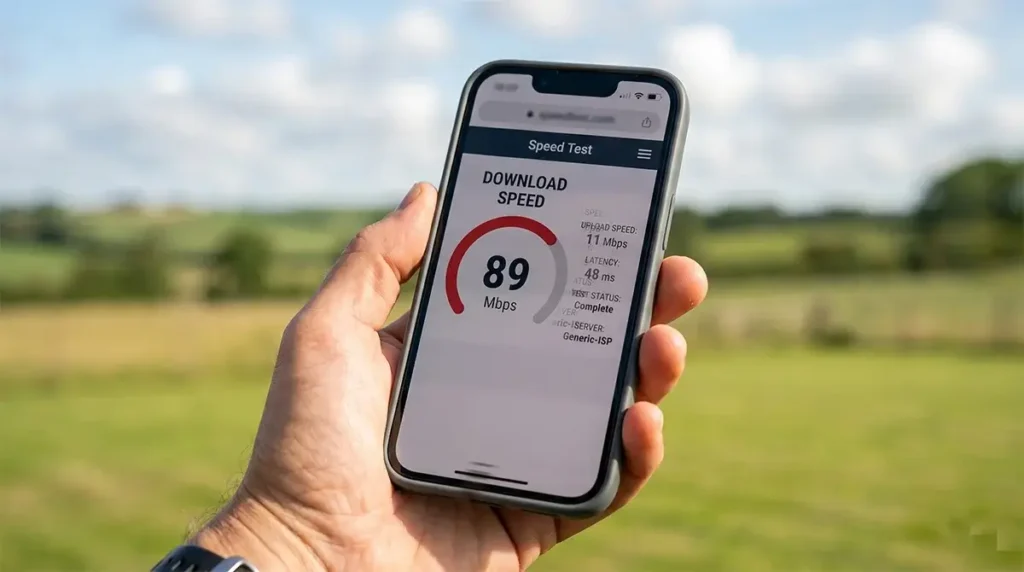
Starlink delivers more consistent speeds than T-Mobile across more rural locations. T-Mobile’s performance advantage on 5G Ultra Capacity coverage (available near urban areas) is irrelevant in deeply rural settings where only low-band 5G or LTE is available. In truly rural environments, Starlink’s median speed typically matches or exceeds T-Mobile’s LTE-based rural performance while delivering superior consistency.
Latency Comparison
Both services deliver latency far better than geostationary satellite options, enabling all real-time applications that HughesNet and Viasat cannot support. The latency difference between them is meaningful but not decisive for most use cases:
- Starlink Standard: 20–60 ms typical, with occasional spikes to 80–150 ms during satellite handoffs
- T-Mobile Home Internet (rural LTE): 35–70 ms typical, very consistent
- T-Mobile Home Internet (5G): 20–45 ms typical
For video calls, VoIP, remote work, and casual to competitive gaming, both services provide adequate latency. The occasional Starlink latency spike is the more relevant differentiator for latency-sensitive applications like competitive gaming — T-Mobile’s LTE latency is slightly higher on average but more consistent, which some users find preferable for gaming.
Reliability and Uptime
Both services have different failure modes:
Starlink outage causes: Heavy precipitation (rare but real), dish obstructions from wind-moved branches, power outages (both cause service loss), and occasional brief satellite handoff drops during periods of sparse satellite coverage. Software updates that require brief service restarts. These are typically brief events (seconds to minutes).
T-Mobile outage causes: Cellular tower outages (equipment failure, maintenance), tower capacity overload during emergencies or events, and severe weather that affects the tower infrastructure. These events are also rare but can last longer (hours) when they involve tower hardware issues.
For rural users who need maximum uptime, running both Starlink and T-Mobile Home Internet with a dual-WAN router provides near-complete redundancy at a combined cost of $170/month — less than Starlink Priority alone.
Winner by Use Case
| Use Case | Better Option | Reasoning |
|---|---|---|
| Remote work (video calls, VPN) | Starlink | Faster speeds, more consistent for bandwidth-intensive work |
| Lowest monthly cost | T-Mobile | $50/mo vs $120/mo — $840/yr savings |
| Most remote rural properties | Starlink | T-Mobile often not available at extreme rural addresses |
| Casual streaming and browsing | Either | Both adequate for Netflix, YouTube, web browsing |
| Rural gaming | Tie (T-Mobile slightly more consistent latency) | Both playable; T-Mobile has no latency spike; Starlink faster |
| Easiest installation | T-Mobile | Plug-in vs. DIY dish installation |
| Telehealth / senior use | Either (T-Mobile simpler) | Both have adequate latency; T-Mobile simpler setup |
| Farm/agricultural operations | Starlink | Higher speeds, better for data-intensive farm management tools |
| Seasonal/vacation property | T-Mobile (if available) | Can leave plugged in unpowered; Starlink needs proper stowage |
The Dual-Connection Strategy: Running Both
For rural households where reliability is paramount — remote workers who cannot afford any internet downtime, small rural businesses, farm operations during planting and harvest — running both Starlink and T-Mobile Home Internet simultaneously with a dual-WAN router is an increasingly popular strategy.
With a Peplink Surf SOHO, ASUS dual-WAN router, or Netgear Nighthawk configured for WAN failover:
- Starlink serves as the primary connection (faster, more reliable for bandwidth-intensive tasks)
- T-Mobile Home Internet automatically activates when Starlink drops for any reason
- Active sessions (video calls, VPN connections) may briefly drop during the failover, but most applications reconnect within seconds
- Total cost: $170/month — still $80/month less than Starlink Priority while providing equivalent business continuity

Final Verdict
Check T-Mobile Home Internet availability at your address first. If it’s available and delivers adequate performance in your specific rural location (verify by ordering and testing — T-Mobile allows returns), it is the better value at $50/month versus Starlink’s $120/month. The $840 annual savings is real and meaningful.
If T-Mobile is not available or delivers inadequate rural performance at your address (below 25 Mbps, inconsistent during business hours), Starlink is the recommended option. Its superior rural performance ceiling, universal availability, and absence of a long-term contract make it the most reliable path to broadband-class rural internet for the majority of rural Americans who cannot get an adequate T-Mobile connection.
For maximum reliability at a property where internet is business-critical: run both with dual-WAN failover at a combined $170/month.
Frequently Asked Questions
Can I switch from T-Mobile to Starlink easily if T-Mobile performance is inadequate?
Yes. Neither service has an annual contract or early termination fee. T-Mobile allows returns within 15 days. You can trial T-Mobile Home Internet, determine whether performance meets your needs, and switch to Starlink if it doesn’t — with the only sunk cost being the 15-day trial period’s $50 service charge (which T-Mobile may waive for returns within the window). This trial approach is strongly recommended rather than ordering Starlink’s $349 hardware without first testing T-Mobile if Home Internet is available at your address.
Is T-Mobile Home Internet getting better in rural areas?
Yes. T-Mobile is actively deploying additional rural towers as part of its network expansion commitments related to the Sprint merger and federal broadband funding agreements. Rural T-Mobile Home Internet availability has expanded meaningfully in 2024–2026 and will continue to expand. If T-Mobile was not available at your rural address 12–18 months ago, it’s worth checking again — availability in your area may have changed.
Which performs better during bad weather?
T-Mobile Home Internet is generally more weather-resilient than Starlink. Rain and clouds do not affect the cellular signal path in the same way precipitation affects satellite signal. Starlink experiences brief outages during very heavy precipitation passing directly overhead. For rural areas with severe weather, T-Mobile’s weather reliability advantage is a real operational consideration — particularly for farm operations where internet access during storm season is critical for monitoring and management.



Leave a Reply