
Running a business from a rural location used to mean accepting second-class connectivity as an unavoidable cost of the rural lifestyle. The slow HughesNet connection that sufficed for personal email was completely inadequate for a Zoom client call, a cloud-based point-of-sale system, or uploading product photos to an e-commerce platform. In 2026, that constraint has been fundamentally dismantled for most rural locations — but turning rural broadband into reliable business infrastructure requires deliberate planning that goes beyond simply ordering Starlink and hoping for the best. This comprehensive guide covers how to build a rural internet setup that genuinely supports business operations, from choosing the right service tier to network architecture, backup planning, and the specific tools and strategies that rural entrepreneurs and business owners have found most effective.
In This Guide
- The Rural Business Internet Reality in 2026
- What Your Business Actually Needs from Internet
- Best Internet Services for Rural Businesses
- Building a Business-Grade Rural Network
- Backup and Redundancy Strategy
- VoIP Phone Systems for Rural Businesses
- Cloud Tools That Work Well on Rural Internet
- Internet Setup by Business Type
- Internet Costs as a Business Tax Deduction
- FAQs
The Rural Business Internet Reality in 2026
The rural entrepreneurship landscape has been reshaped by connectivity in ways that would have been inconceivable a decade ago. E-commerce businesses, consultancies, creative agencies, remote support operations, agricultural technology companies, rural healthcare providers, real estate agents, and dozens of other business types now operate successfully from rural locations that previously could not support internet-dependent business models.
The change is driven by two concurrent forces: Starlink’s deployment making broadband-class internet available to virtually any rural property, and the broader migration of business tools to cloud platforms that work over internet connections rather than requiring local server infrastructure. A rural business that in 2015 would have needed a local server room, a T1 line, and an IT staff to match a city competitor’s infrastructure can now match that capability entirely through cloud-based tools accessed over a well-configured Starlink connection.
But rural business internet still requires more deliberate infrastructure planning than urban equivalents. The absence of alternative providers means that a single connection failure at a critical moment — a client call, a deadline, a point-of-sale transaction during peak business hours — has consequences that urban businesses with redundant fiber or cable options don’t face. Building redundancy, managing bandwidth across multiple business users and use cases, and understanding the specific limitations of your rural connection are essential components of rural business infrastructure planning.
What Your Rural Business Actually Needs from Internet
Business internet requirements vary enormously by business type, but several categories of need are universal:
Video conferencing reliability: Client calls, vendor meetings, team collaboration — virtually all business relationships now involve regular video calls. A connection that cannot sustain stable HD video calls (minimum 5 Mbps upload/download per session, under 150 ms latency) will create professional friction that erodes client relationships over time. This is the single most important performance metric for most rural knowledge businesses.
Upload speed adequacy: Rural businesses that transfer files to clients, upload product content, back up data to the cloud, or support remote workers consistently need more upload bandwidth than rural consumers. Starlink’s 8–18 Mbps upload is adequate for most small business operations; larger operations (video production, large file delivery) benefit from Starlink Priority’s 15–35 Mbps upload tier.
Consistent uptime during business hours: A rural retail business that loses internet connectivity loses its ability to process card payments, access inventory systems, and potentially serve customers. A rural consultant whose internet drops during a client presentation damages their professional reputation. Business-critical connectivity requires backup planning that consumer residential connections don’t prioritize.
Security and network separation: Mixing business and personal traffic on the same network creates security risks and can complicate business accounting and tax deduction documentation. A properly configured business network separates business devices from family/personal devices and implements appropriate security controls.
Best Internet Services for Rural Businesses in 2026
Starlink Business ($250/month): The dedicated business tier of Starlink is designed for commercial operations and provides priority data allocation beyond the residential 1 TB threshold, higher upload speed targets (15–35 Mbps), and service level terms better suited to business use. For rural businesses with 5+ employees, significant client video call volume, or consistent cloud data transfer needs, the Business plan’s priority allocation and higher upload floor are meaningful operational improvements over the Standard residential plan.
Starlink Standard ($120/month) — viable for most small rural businesses: For rural solopreneurs, home-based businesses, and small operations with 1–3 employees, the Standard plan provides entirely adequate performance for typical business applications — video calls, cloud software, email, file sharing, and e-commerce management. The 1 TB priority data threshold is sufficient for most small business workloads that don’t involve continuous high-bandwidth operations.
T-Mobile or Verizon Home Internet ($50–$60/month) as backup: Running a low-cost cellular home internet connection as an automatic backup to Starlink provides business continuity at a fraction of the cost of a second full-service business internet plan. At $50/month, T-Mobile Home Internet as a Starlink backup costs less than $600/year and eliminates the single-point-of-failure vulnerability of relying on one connection.
Local WISP if available: Local fixed wireless providers sometimes offer dedicated business plans with service level agreements (SLAs) that guarantee minimum uptime and response times for repairs. For businesses requiring maximum reliability, a local WISP SLA provides contractual accountability that Starlink’s residential and business plans do not.
Building a Business-Grade Rural Network
A rural business network that reliably supports professional operations requires deliberate architecture beyond simply connecting devices to a router:
Separate business and personal networks: Configure your router to create distinct Wi-Fi networks — one for business devices (computers, printers, business tablets, POS systems) and one for personal and guest devices. This separation prevents personal video streaming from consuming bandwidth during a client call, isolates business traffic for security, and simplifies documentation of business internet use for tax purposes.
QoS for business traffic prioritization: Configure Quality of Service rules on your router to prioritize video conferencing traffic (Zoom, Teams, Meet) over background processes (cloud backups, software updates, file sync). With a router like the ASUS ZenWiFi or UniFi Dream Machine Pro, you can specifically prioritize your video conferencing applications to maintain call quality even when other household users are streaming video.
Wired connections for critical business equipment: Desktop computers, point-of-sale terminals, IP phones, and network printers should be connected to your router via Ethernet rather than Wi-Fi. Wired connections eliminate Wi-Fi reliability variables from your most critical business equipment.
Business VPN for remote employees or data security: If your business has employees accessing company systems remotely, or if you handle sensitive customer data that requires encryption in transit, a business VPN implementation provides security that consumer internet services don’t include. Options range from self-hosted solutions (OpenVPN on your router) to managed business VPN services (Cisco AnyConnect, Palo Alto GlobalProtect) depending on your IT capabilities and compliance requirements.
Backup and Redundancy Strategy for Rural Businesses
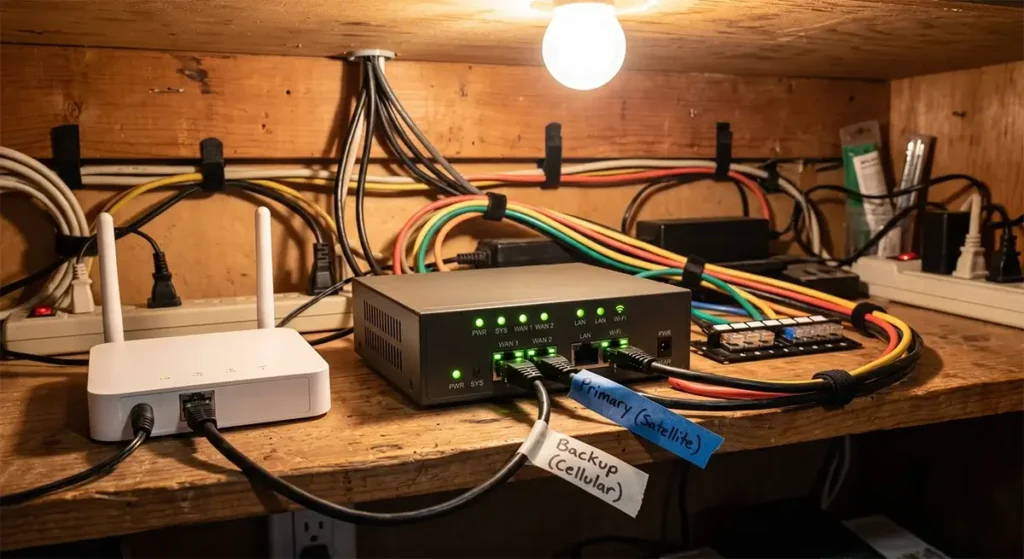
The most important infrastructure investment a rural business can make is a redundant internet connection with automatic failover. The components:
Primary connection: Starlink Standard or Business for most rural locations — highest reliability ceiling and best performance for the widest range of business applications.
Backup connection: T-Mobile or Verizon Home Internet where available ($50–$60/month). In areas without cellular home internet eligibility, a cellular hotspot on a dedicated unlimited data plan from Verizon or AT&T ($50–$80/month) provides backup data connectivity.
Failover hardware: A dual-WAN router that automatically switches traffic to the backup connection when the primary connection fails. The Peplink Surf SOHO ($200) is the most popular option for small rural businesses, supporting simultaneous Starlink WAN + cellular WAN with automatic load balancing and failover. The Peplink Balance 20X ($500) adds cellular modems built into the router unit, eliminating the need for a separate hotspot device as backup.
UPS protection: An uninterruptible power supply on your router, modem, switches, and key business computers provides 15–30 minutes of continued operation during power outages — long enough to gracefully end client calls, save work in progress, and complete critical transactions before powering down. Rural power quality is often lower than urban areas, and even brief power dips that cause router reboots can disrupt client calls at the worst moments.
VoIP Phone Systems for Rural Businesses
Landline phone service is increasingly unavailable or unreliable in rural areas, while cellular-only voice service doesn’t provide the professional phone system features (auto-attendant, call routing, hold music, voicemail-to-email) that many rural businesses need. VoIP systems over Starlink or low-latency rural internet solve this — but only if the connection’s latency is adequate.
VoIP phone call quality requires latency under 150 ms and packet loss under 1% for natural-sounding calls. Starlink and cellular home internet both meet these requirements; HughesNet and Viasat do not. Popular rural-friendly VoIP systems include:
- RingCentral ($30–$45/user/month): Enterprise-grade features including auto-attendant, call recording, video meetings, and mobile apps. Works well over Starlink.
- Ooma Office ($20–$25/user/month): Small-business focused with simpler setup than enterprise solutions. Good for 1–10 person rural businesses.
- Nextiva ($30–$40/user/month): Strong rural customer reviews, US-based customer support, and reliable performance on Starlink.
- Google Voice (Business) ($10/user/month): Budget-friendly option for solo practitioners and very small businesses. Integrates with Google Workspace tools.
According to FCC guidance on VoIP services, rural businesses using VoIP for primary phone service should ensure their E911 service address is correctly registered, as VoIP 911 calls route differently than traditional landline 911.
Internet Setup Recommendations by Business Type
| Business Type | Recommended Service | Key Network Config | Backup Strategy |
|---|---|---|---|
| Freelance consultant / remote worker | Starlink Standard | Bypass mode + mesh router, wired desk connection | T-Mobile hotspot |
| Rural retail / point of sale | Starlink Business or local WISP with SLA | Wired POS, separate guest Wi-Fi | Cellular failover router |
| Farm / agricultural business | Starlink Business + field cellular | LoRaWAN for IoT sensors, Ethernet to outbuildings | Verizon hotspot |
| Rural healthcare / telehealth | Starlink Business or local WISP | Dedicated VLAN for telehealth, HIPAA-compliant VPN | Cellular failover, UPS |
| E-commerce / product business | Starlink Standard | Upload speed test first; Priority if heavy uploads | T-Mobile Home Internet |
| Creative agency / video production | Starlink Priority | NAS for local storage, QoS for upload bandwidth | Cellular failover, UPS |
| Rural hospitality / vacation rental | Starlink Standard + mesh for property | Separate guest network, bandwidth limits per guest | T-Mobile Home Internet |
Rural Internet as a Business Tax Deduction
For rural business owners and self-employed individuals who use internet for business purposes, internet service costs are a legitimate business expense deductible from federal income taxes. The deductibility rules:
- If internet is used exclusively for business: The full monthly cost is deductible as a business expense.
- If internet is used for both business and personal purposes: The deductible percentage is based on the actual business-use percentage. A common and defensible approach for home-based businesses is to document business use hours and calculate the percentage of total internet use that is business-related.
- For separate business-dedicated internet connections: A second internet connection used exclusively for business (such as a dedicated Starlink Business account used only in a home office separate from the household’s residential account) is fully deductible as a business expense with straightforward documentation.
Consult your tax professional for guidance specific to your business structure and state tax rules. Maintain records of your internet service agreements and monthly bills as supporting documentation for deductions.

Frequently Asked Questions
Is Starlink reliable enough to run a rural business full-time?
Yes, for the vast majority of rural business types. Starlink’s typical uptime of 99%+ (with brief outages measured in minutes per month for most users) is adequate for professional business operations when paired with a cellular backup connection. Thousands of rural businesses — from consultancies to farms to retail operations — rely on Starlink as their primary business internet successfully.
Do I need the Starlink Business plan, or will Standard work?
For most small rural businesses (1–5 employees, typical cloud software usage, regular video calls, no continuous high-bandwidth transfers), the Standard $120/month plan provides adequate performance. The Business $250/month plan is justified for operations with 5+ simultaneous users, consistent high-bandwidth upload needs (video production, large file delivery), or where the priority data allocation becoming deprioritized late in the month creates operational issues.
Can I process credit card payments on rural internet?
Yes. Credit card processing (Square, Stripe, Shopify Payments, and all major payment processors) requires only a few Mbps of internet and is highly resilient to latency variations. Point-of-sale transactions complete in under one second on any Starlink or cellular home internet connection. The main concern is backup connectivity for a payment terminal during a primary internet outage — ensure your POS system supports cellular backup (many Square and Clover terminals have built-in cellular backup capability).




Leave a Reply